Posts

Showing posts with the label Code

Dependency Injection for Azure Function

Enabling dependency injection on your Azure Function a little bit different than the usual process like you do on the .Net Core applications. Here I'm planning to share some tips and steps you should follow if you need to enable DI on Azure Functions with C#. I'm focusing on a function application created for HTTP Trigger. When you create a new project you will see a static class and method to run your function end-point.  1 2 3 4 5 6 7 8 9 10 11 public static class FunctionWithDI { [FunctionName("function-with-di")] public static async Task<IActionResult> Run( [HttpTrigger(AuthorizationLevel.Function, "get", "post", Route = null)] HttpRequest req, ILogger log) { log.LogInformation( "C# HTTP trigger function processed...
Dependency Injection for .Net Core console application

Image
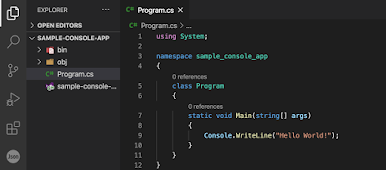
As many organizations are now migrating their on-premise applications to the cloud platform now there are many requirements to convert legacy .Net application written in .Net Fullframework to .Net Core.  In this article, I want to share a simple way to enable the .Net core dependency injection, especially on a console application. If you create a new Asp .Net Web API or Web App the project scaffolding template will provide you the initial code for dependency injection. But console applications you will need to do as below. First I will start by creating a new project. I use the visual code terminal to create a new project called "sample-console-app" so the project name will be constructing from the directory name where you execute the below command.  > dotnet new console The above command will create you the project and you will see your project view like below. You can run the below commands to restore dependencies and run the application. > dotnet restore > dotn...

Store your application data in Redis

Redis is an in-memory data store that is open-source and can be used as an alternation for database, message broker, cache. Redis supports multiple data formats such as string, lists, sets, hashes, bitmaps, etc.  Here in this article, I'm sharing an easy and simple way to use Redis as your data store in your application.  In this sample code, we will store data as hashes that data is JSON serialized. You can install Redis on your machine or can use Azure Redis for Cache if you have an Azure account.  In order to communicate with Redis, you need to use " StackExchange.Redis " NuGet package.  Here are the things you need to do. Let's start with the interfaces. You need an interface for Redis Connection Factory which helps to create the Redis connection for your application.  using StackExchange.Redis; namespace RedisDemo.Interfaces {     public interface IRedisConnectionFactory     {         ConnectionMultiplexer Connecti...

Storage Table - Easy data access layer

You can simply use the below code structure when you want to write a data access layer for Azure Storage Table.  Use blow Interface as the skeleton of your data access class.       public interface ITableStorage<T>     {         Task<List<T>> GetAllAsync(string partitionKey);         Task<List<T>> RetrieveEntityAsync(string partitionKey, string rowPrefix);         Task<T> GetSingleAsync(T entity);         Task<T> GetSingleAsync(string partitionKey, string rowKey);         Task InsertEntityAsync(T entity, bool forInsert = true);         Task DeleteEntityAsync(T entity);         Task DeleteSingleAsync(string partitionKey, string rowKey);         Task<List<T>> RetrieveAsync(string partitionKey);     } Here is the generic concrete cl...

C# Interactive

Image
Think... You have a solution with multiple C# projects and include maybe 1000 classes which are so hard to debug and test. But you have a task to validate the output of certain functions when certain parameters have specific values assigned. Especially, you don't have unit tests added or difficult to implement unit tests.  Idea... You can use C# Interactive to cater to everything above and there are many benefits. C# Interactive is a feature that comes with Visual Studio 2015 update 1 and later versions. It is a REPL Editor for C# (Read-Evaluate-Print-Loop). If you are interested in learning how to code you can use the online version of this C# Interactive to write and execute codes.  You can use Microsoft's C# learning site if you don't have Visual Studio installed on your PC.  If you have Visual Studio installed in your machine you can go to View > Other Windows > C# Interactive to open the C# Interactive window. If you want to execute any method in C# Interac...